
AI has shifted from being a want into a need across most business functions. Once seen as an experimental add-on, AI is now embedded into everyday operations, shaping the way companies work, compete, and innovate. However, deciding on an AI tech stack is still a bit difficult as this shift is still new – and many still say that AI isn’t producing as much gain as cost.
As we approach 2026, here are a few recommendations on the top AI tools for businesses in 2026; or more so essentials in your tech stack. Of course, the new year will give us many new options, but here’s where to begin.
Let’s get down to a brief overview of the growing need for AI, the top 10 AI tools businesses should consider in 2026, their advantages and drawbacks, why the demand for AI is surging, what makes an AI tool valuable, and how the landscape of AI tools is likely to evolve.
The Growing Need for AI
Approximately 88% of companies now use AI in at least one business function according to McKinsey. That’s a dramatic shift from only a few years ago. In 2020, approximately 50% of companies used AI in at least one business function. This shows a 56% increase in five years, and this trend is only going to escalate.
AI has now moved into the mainstream.
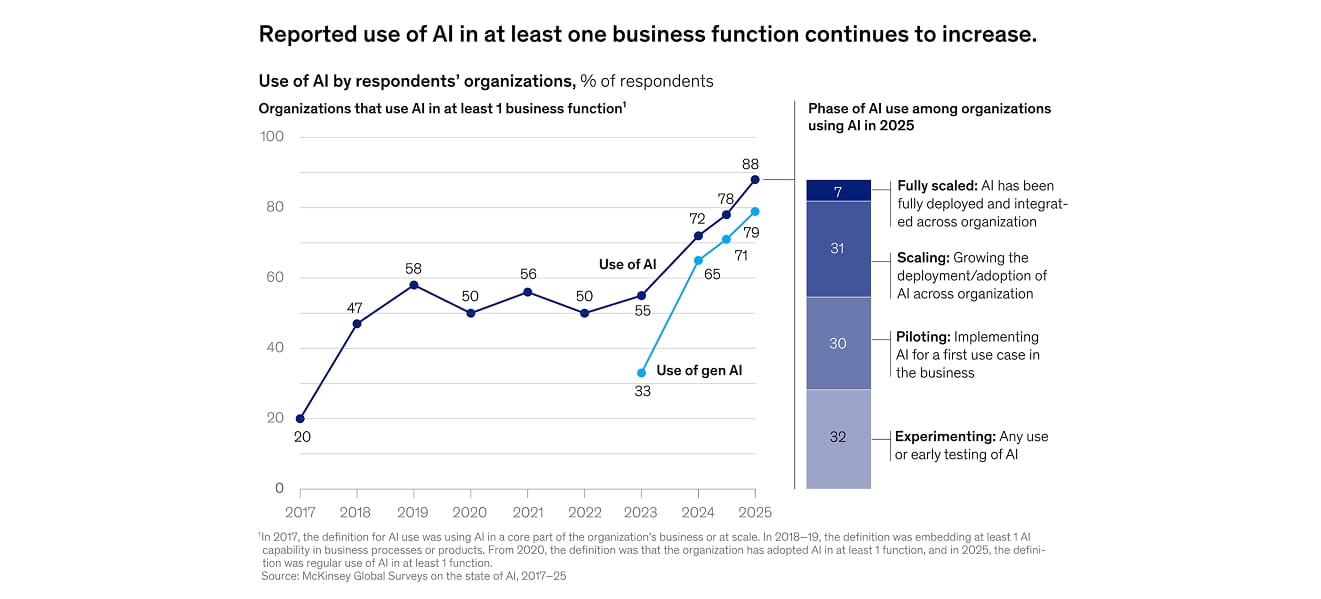 Image sourced from: McKinsey State of AI Report 2025
The urgency to adopt AI is driven by a combination of efficiency demands, cost pressures, and competitive necessity. Businesses no longer have the luxury of predicting whether AI will matter. It already does. Organizations that deploy AI are seeing sharper productivity gains, lower costs, and greater agility compared to those who are not.
AI answers three major challenges businesses face today:
- Scale: AI automation allows organizations to handle operations at volumes far beyond human ability.
- Personalization: From marketing campaigns to customer support and advertising, AI can tailor interactions in real time, driving stronger engagement.
- Data overload: With information streaming from every direction, AI makes sense of the chaos by extracting trends, spotting risks, and generating insights for decision-making.
Even small businesses are reaping the benefits. For example, a boutique e-commerce store might use AI to generate email campaigns, automate social media scheduling, and optimize ad spend with predictive analytics. By combining these capabilities, the store can compete with much larger rivals without increasing headcount.
Gartner surveys support this trend: nearly 34 % of companies using generative AI in 2025 report major productivity gains. These savings and efficiencies are what make AI a core part of their business strategy. For others, AI helps boost revenue and increase customer satisfaction.
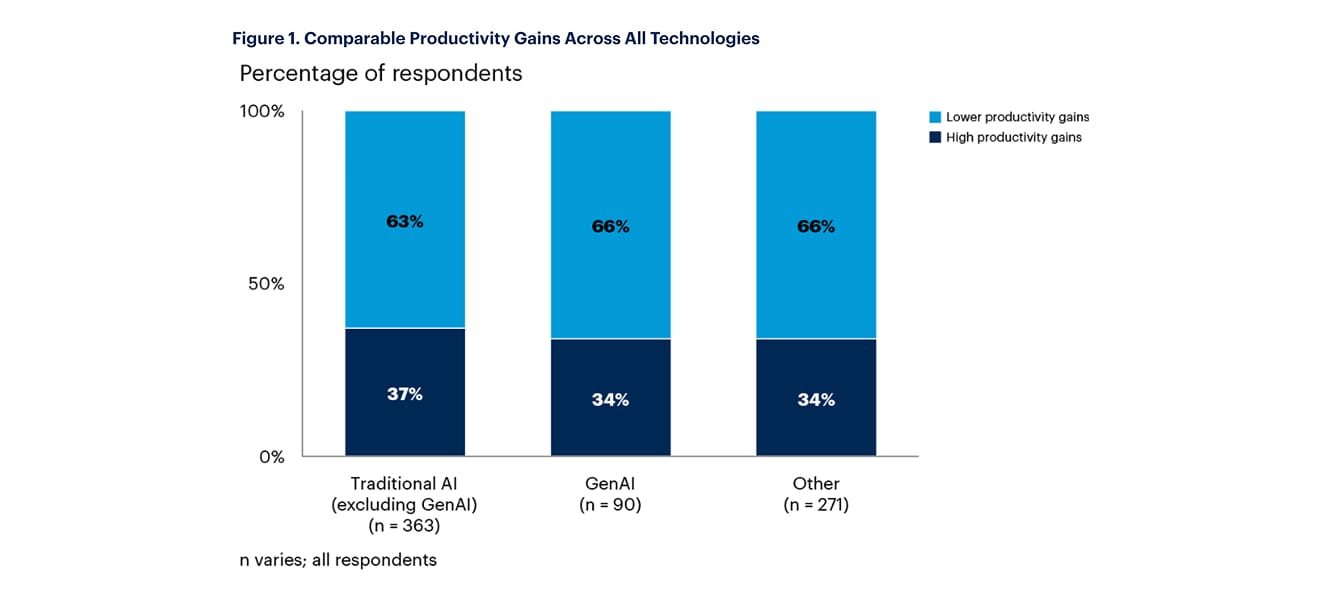 Image sourced from: Gartner 2025
So, if you are planning your 2026 tech stack, you’d want to select tools that are tried and tested and will actually add to your gains. Check out some tools most businesses should consider in the next section
Top 5 AI Tools for Businesses in 2026
Microsoft 365 Copilot

You must have heard of or used Microsoft 365 in their workspaces. While some may find Microsoft tools a little annoying, Copilot is reporting high gains. If you didn’t already know, Copilot is embedded into Microsoft 365 apps (Word, Excel, Teams, Outlook, etc.) to assist. It automates routine tasks, freeing up human effort for higher-value work.
Here are its pros and cons:
| Pros | Cons |
| Deep integration with tools businesses already use leading to lower friction to adoption. | Some IT leaders report poor data quality is a top concern when deploying Copilot. |
| Many companies report 10–20% productivity improvements for a significant portion of users. | Users may rely on Copilot for complex reasoning where human judgment is still needed. |
| Strong enterprise-level security. | For large-scale adoption, licensing can become expensive. |
| Usable by individual contributors, teams, or across entire organizations. | Users raised concerns around bias, data privacy, and transparency |
a) Strategic value: Copilot acts as a force multiplier; not just for productivity, but for cultural change: teams who adopt it effectively tend to rethink work, shifting less “who wrote this email” and more “what insights can I pull from our data?”
b) Scalability: Because it’s built on Microsoft’s cloud and licensing model, companies can scale Copilot from pilot to enterprise without needing completely new infrastructure.
c) Risk: Governance remains a top challenge. Poor data hygiene or weak adoption strategies can lead to misuse or underutilization. Also, while ROI stories are strong, not all tasks are well-suited to AI assistance: overly complex or ambiguous tasks may still require human work.
d) Future readiness: As organizations mature in their AI adoption, Copilot can serve as the foundation to build custom copilots or agents that are specialized for business workflows.
According to a Forrester-commissioned study, small-to-medium businesses saw 132% to 353% ROI over three years using Copilot.
Hubspot AI

HubSpot is building “hybrid human-AI teams,” combining its CRM with AI agents, data-cleaning tools, and intelligent workflows. New HubSpot features (2025) include a Data Hub (to unify, clean and use data), and Breeze Agents to automate tasks.
AI-powered CPQ (Configure, Price, Quote) for commerce is also part of their rollout.
| Pros | Cons |
| Integrated AI agents across Teams automating support, research, content, and outreach. | The Breeze customer agent uses a credit‑model for usage, which some find confusing or expensive for heavy usage. |
| Customer agent resolves queries around the clock, working across channels like WhatsApp, email, Messenger. | It takes time and effort to configure agents, tailor their behaviour (brand voice, guardrails), and tune them. |
| Agents improve over time, and there are built-in analytics to track performance and optimize. | If your CRM / knowledge base data is poor or fragmented, agents may misunderstand or respond poorly. |
| AI handles common support issues (e.g., password resets), freeing human agents for more complex work. | As with many AI-driven support tools, bots may struggle with nuanced or emotional customer issues. |
| Works across marketing, sales, and service; agents can work with unstructured data (e.g., PDFs, website content) to answer customer questions. | Overreliance on AI could alienate customers who prefer humans for certain interactions; may reduce human‑customer touchpoints. |
| HubSpot emphasizes trust and safety; agents can be configured with approval flows / guardrails. | Heavy use of agents may use up credits quickly, especially in high‑volume support or content tasks. |
| According to HubSpot, Customer Agent can be set up quickly. | Some users report issues like agents replying to spam, getting stuck in loops (“robot wars”), or not understanding custom data. |
| AI handles routine / repetitive work while humans take over for more complex tickets. | According to some users, certain AI‑driven workflow actions or property generations feel “undercooked” or not as useful. |
a) Strategic value: HubSpot’s approach — embedding AI deeply in its CRM — means AI is not just a bolt-on but part of the core system. This is powerful for sales and marketing teams that rely on CRM data.
b) Scalability: With Data Hub + Breeze Agents, businesses can scale from simply cleaning data to building intelligent workflows that act automatically.
c) Risk: Success depends on data maturity; if a business’s CRM data is messy, AI won’t help much. Also, if agents generate poor outputs, there may be trust issues.
d) Future readiness: HubSpot’s vision of hybrid teams suggests more automation and agent-driven workflows in the near future. For businesses, this is a way to gradually delegate low-level processes to AI while keeping humans in strategic roles.
According to HubSpot’s 2024 quarter results, over 80+ AI features are embedded across its hubs.

Jasper AI

Jasper is a generative AI tool for content marketing: blogs, ad copy, social media, email campaigns, long-form content. It helps maintain brand voice, scale content production, and optimize for SEO.
| Pros | Cons |
| Specialized for marketing content: blogs, email, ads, social media. | Can produce generic or low-originality content if not guided well. |
| Templates and frameworks speed up content creation. | It sometimes generates too much content, not all strategic. |
| Maintains brand voice using “brand memory.” | Higher cost at enterprise or high-volume levels. |
| Supports multi-user collaboration (teams). | Teams may become over-dependent, reducing human creativity. |
| SEO-focused features to align content with search strategy. | Requires careful editing / review for accuracy and tone. |
| Can dramatically reduce time to publish. | Risk of AI “hallucination” or factual mistakes in generated content. |
a) Strategic value: For marketing-led businesses, Jasper offers a high-leverage way to scale content production without scaling headcount equivalently.
b) Scalability: As content needs increase (blogs, ads, email), Jasper is a powerful tool, especially when combined with SEO tools or content operations.
c) Risk: Without a clear strategy, content risk becomes high: AI can generate a lot, but not all of it will convert or resonate. Quality control is essential.
d) Future readiness: Jasper is likely to remain critical for businesses that view content as a growth engine. As models improve, Jasper may incorporate multimodal content (text + images), real-time personalization, and deeper data integration.
Credofy reports that businesses using Jasper have “cut time-to-publish by up to 80%” and significantly boosted ROI for campaign content.
The next two tools may get better in 2026, so it’s worth keeping an eye on them.
Artisan AI
Artisan builds AI “employees” (called Artisans) to fully automate business functions: not just assist, but act like real digital teammates. The platform consolidates the sales tech stack, reducing the need for multiple outbound tools. It easily integrates with other CRMs / tools: Slack, HubSpot, Salesforce, etc.
Ava is Artisan AI’s autonomous AI BDR (Business Development Representative) that handles nearly all outbound sales tasks end-to-end; from researching leads and personalizing outreach to managing email deliverability and following up. It uses a massive B2B contact database and a “personalization waterfall” to craft highly targeted, multi-channel sequences.
Ava then hands qualified responses to human reps and continuously self-optimizes based on real-world feedback.
| Pros | Cons |
| Automates ~80%+ of outbound BDR tasks (lead research, outreach, email, follow-up) | Not every company is an ideal fit. as Artisan’s founder said, some clients perform poorly with AI SDR. |
| 300M+ verified B2B contacts for targeting | High usage / scaling may be expensive |
| Email + LinkedIn sequences built and managed by Ava. | It’s primarily for outbound sales — not meant for customer service / support. |
| Warm-up, reputation monitoring, dynamic sending limits | As with all AI agents, it requires close monitoring: especially for tone, response quality. |
| Learns from feedback to improve personalization and response rates. | Some users on Reddit report many messages, but few converted meetings / low quality replies. |
| Allows scaling outbound without proportionally hiring more BDRs. | Some may not like “AI employees” from a brand or reputation perspective (or fear over-automation). |
| According to Artisan, clients can be live within days. | They’re building more agents (e.g., for inbound, meeting management) but features may be beta or limited. |
a) Strategic Value: Artisan is positioning itself as a digital teammate. For companies that rely heavily on outbound B2B sales, Ava can replace or supplement BDRs, freeing human reps for closing deals, strategic outreach, and high-touch relationships.
b) Efficiency Gains: Because Ava is handling research, targeting, sequence creation, and follow-ups, sales teams can dramatically scale outreach without proportionally scaling headcount, potentially reducing cost per lead and increasing pipeline velocity.
c) Optimization Over Time: The self-learning mechanism is powerful. With feedback (response sentiment, reply data), Ava can optimize messaging to match what works, improving conversion rates over time.
d) Stack Consolidation: Many companies use multiple tools: data providers, email warm-ups, sequence builders, outreach tools, CRMs. Artisan packs many of these into one, streamlining operations, reducing tool fragmentation, and potentially lowering costs.
e) Risk & Governance: As with any autonomous AI agent, there’s risk around control, tone, and brand alignment. You need robust oversight, especially early on, to tune the agent. Also, not all businesses are a fit. if your ICP is very niche or your product requires a human touch early in the conversation, the ROI may be limited.
f) Future Readiness: Their roadmap (inbound agent, meeting manager) suggests that Artisan is betting on more “AI employee” types, not just SDRs.
On their site, Artisan claims that 80% of an outbound team’s tasks can be automated by Ava.
Synthesia

Synthesia is an AI video creation platform that turns text into professional videos using realistic AI avatars and studio-quality voiceovers. It enables teams to produce training content, marketing videos, onboarding guides, and internal communications without cameras, actors, or editing software. By dramatically reducing production time and cost, Synthesia helps businesses scale high-quality video content at speed and in over 140 languages.
| Pros | Cons |
| Fast production and scalable: You can turn text into video quickly. | May lack the full feel of having a real person on camera and may feel less personal in some contexts. |
| Supports multiple languages and is localization-friendly. | Customization (avatars, tone, brand feel) might require time to tune for your brand. |
| Reduces cost/time of traditional video production. | AI avatars and voiceovers may still have limitations in emotional nuance. |
a) Strategic Value: Synthesia acts as a scalable content engine. Teams can produce high-quality training, marketing, or internal videos rapidly without cameras or actors, freeing human resources for creative and strategic work.
b) Efficiency Gains: Converting text or slides into polished videos drastically increases output while reducing production time and cost by up to 90% compared with traditional methods.
c) Optimization Over Time: Templates, avatars, and AI voices allow standardized branding and continuous improvement in video quality and engagement metrics.
d) Stack Consolidation: Synthesia combines scripting, production, multilingual support, and avatars in one platform, reducing reliance on multiple video tools.
e) Risk & Governance: AI avatars may feel less natural in high-empathy contexts; oversight is needed to maintain brand tone and prevent over-automation.
f) Future Readiness: With interactive video and enterprise governance features on the roadmap, early adopters can build scalable, multilingual video workflows for a competitive advantage.
Teleperformance used Synthesia to create training videos in 40+ languages, saving 5 days of work and around $5,000 in production costs per video.
How to Choose the Right AI Tool
Not all tools fit every company. The right choice depends on business goals, industry, and resources. To narrow the field, it helps to think of tools in categories: content and marketing, customer support, productivity, development, creative design, or workflow automation. Comparing tools within each group clarifies where the gaps and opportunities lie.
The biggest decision often comes down to trade-offs. A generalist tool like ChatGPT is versatile and cost-effective but may not outperform a specialist tool like Jasper AI for SEO content.
Likewise, a high-impact niche tool may justify its cost better than a cheaper, broad one that underdelivers. Integration into existing systems and the risk of vendor lock-in also matter. If a tool doesn’t mesh well with your workflow, employees won’t adopt it, no matter how advanced it looks on paper.
The best approach is to
- Start with a small pilot project.
- Assign a team to test the tool for one clear purpose: drafting marketing copy, streamlining meeting notes, or coding a feature
- Measure outcomes like time saved or engagement boosted.
- Decide whether to use or check out alternatives based on results
The Future of AI Tools in Business
Looking ahead, AI’s role in business is poised to grow even bigger. One of the most exciting developments is the rise of autonomous AI agents. Analysts predict that a quarter of enterprises using AI in 2025 may deploy such agents, signaling a major shift in how businesses operate.
Another clear trend is multimodality. Instead of juggling multiple apps, businesses will increasingly turn to platforms that unify text, images, audio, video, and structured data in one place. A single system might generate a blog, create a matching image, and narrate it as a podcast.
Industry-specific AI will also become more prominent. Whether in healthcare, law, finance, or logistics, specialized models tailored to the nuances and compliance needs of each sector will take center stage. These models won’t just generate content, they’ll also help with regulatory requirements, risk detection, and industry-specific tasks.
Finally, regulation and explainability will grow in importance. With AI influencing critical decisions, businesses will be expected to use tools that are transparent, auditable, and fair.
The European Union’s AI Act, which comes into force in 2025, is a sign of how governments are tightening oversight. For companies, that means choosing tools that are compliant and capable of providing visibility into how they make decisions.